What Today shows
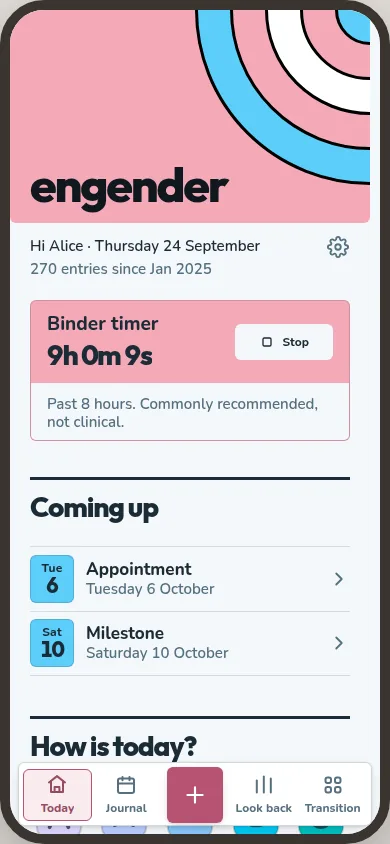
Today is the first tab, and the app opens on it. It is about what is going on now and what is next.
Live tiles. Things running right now, such as a wear timer or a dose that is due. A tile shows up when there is something to say and goes once it is dealt with.
Coming up. Dated things in the next thirty days: appointments, surgery dates, milestones, letters due to open and doses on a schedule that is not daily. It shows three and folds the rest, and it is not there at all when nothing is coming.
Notices. Short reminders you can dismiss, such as an old backup or a medication running low.
How is today? Five moods, from awful to great. Picking one starts today's entry.
Pinned. The parts of the app you keep on Today. Each row says what is next when there is something, and when you last logged it otherwise.
A new journal also has a Getting started section, with a few things worth setting up early. You can ignore them and just write.
Arranging Today
Tap Arrange these rows to choose what is pinned and in what order, which kinds of date Coming up shows, and which live tiles can appear. The first set of pins comes from the areas you picked during setup. After that, the app never pins or moves anything by itself.
Quick add
The button in the middle of the bottom bar is quick add. It works from any screen and opens a fan of options: the five moods, an entry for an earlier day, the two tally counters, a dose, and starting or stopping a wear session. Screens that log something keep their own add button as well.
Where an entry goes
An entry started from Today, from quick add or from Journal is the same kind of entry. Journal shows it on its day, and Look back counts it with the rest.