The Transition tab
The fourth tab, Transition, has four groups: Health, Steps, Support and Media. Search at the top finds group rows by name and searches text in your journal.
Health is the first group.
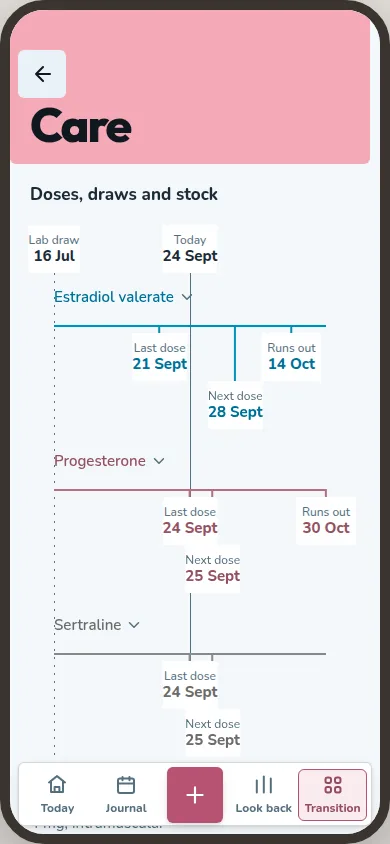
Care
Care is where your medication lives. Each drug in a running regimen gets its own lane. The timeline marks your latest lab draw. For each regimen, Care shows the dose and route, your last dose, when the next one is expected and how much you have left, with the projected run-out day.
Four screens open from Care:
Regimen. What you take, how and how often, from the day you started. You can pause it or end it, and it stays in your history. If you switch it on, a schedule records an expected dose as taken after that day ends. You can correct it or mark it skipped.
Doses. Every dose taken, skipped or changed, at the time it happened.
Labs. Your results, as you entered them. Results in different units stay on separate lines.
Hormone curve. A drawing of how your doses rise and fall over time. It is not a prediction of your levels. Your own lab results can calibrate it.
Stock is a count you enter now and then. Logged doses feed the stock estimate and projected run-out day, as well as supported hormone curves. Care warns when stock is running low. It also shows the running window's medication-days total; the full exposure history is in the clinician visit summary.
Changes you've noticed
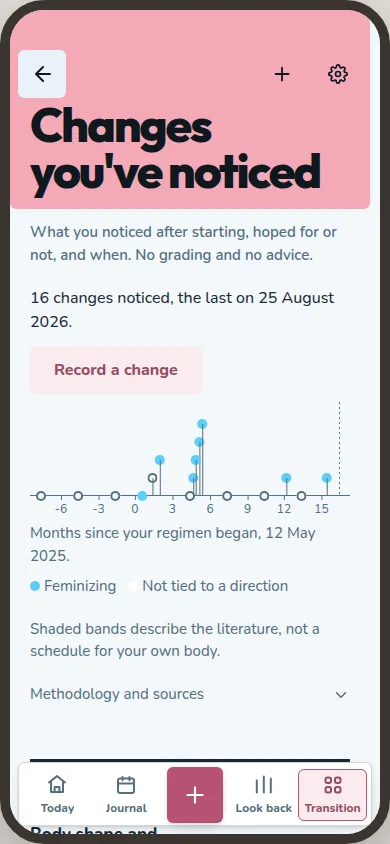
Under the medication, Care keeps the changes you've noticed. Pick a change from the list or add your own, and mark the day you first noticed it. Side effects go here too, each with how strong it was, from 1 to 5. The more private categories, such as genital and sexual changes, start switched off.
Hair progress. Your hair on a published scale, Norwood-Hamilton or Sinclair, or in your own words, with photos taken from the same spot.
Cycle events. A period, spotting, or nothing this month. They only show while a testosterone regimen is running, or once you turn on Cycle tracking in Settings.
Measurements and sizes
Waist, hips, chest and underbust are built in, and you can add any measurement you like. Weight and height are not built in, so add them yourself if you want them. Measuring consistently, beside the chart, says how to measure the same way each time.
Sizes are what you bought and how it fit: the kind of garment, the size, the brand and a note. Nothing is converted between brands.
Surgery journey
Each surgery gets its own journey, named however you like. It holds the consults before it, the date once you have one, and afterwards a day count, photos, notes and your own checklist.
If your surgeon gave you a dilation schedule, type it in and log your sessions against it.
Appointments
Appointments opens on your next visit and how far away it is. Under it is What to raise, your list of things to bring up, which carries over from one visit to the next.
At the visit, In the room goes through your questions one at a time, with space for what they said. Past visits are under Behind you, and the app asks how each one went.
The clinician visit summary is a page to print for a doctor: doses, lab results and side effects for dates you choose. You see it exactly as it will print. Open it from Care or from Appointments.
What Health does not do
Nothing in Health says whether a number is good or bad, suggests a dose or tells you what to do. It keeps what you enter and draws it.